
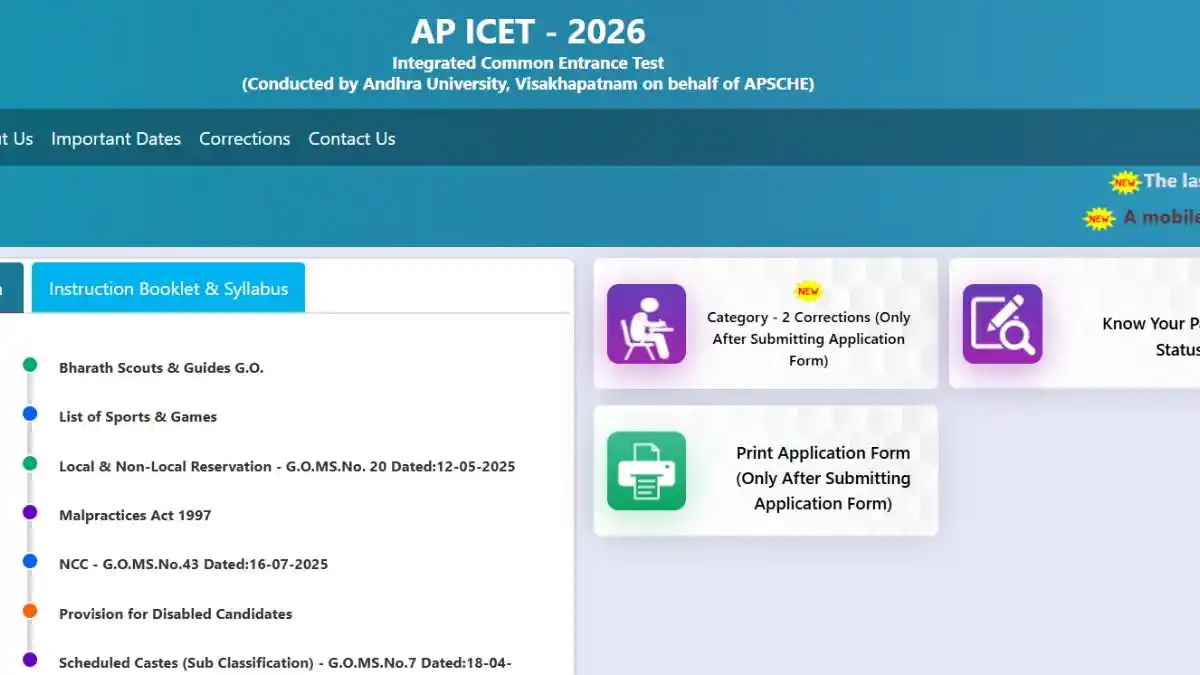
As soon as the AP ICET 2026 form correction window opens you will be able to rectify minor errors in your application. This facility is available exclusively to registered candidates and will ensure the smooth completion of your admit card issuance and the counseling process.
Important Dates for AP ICET 2026
The correction window for the AP ICET 2026 application form is primarily expected to open in April 2026 likely commencing around April 6. Registration is already underway and the deadline for submitting applications with a late fee may be extended until April.
Please confirm the exact dates on the official website: cets.apsche.ap.gov.in.
Categories of Corrections in AP ICET 2026 Form
The correction process for the AP ICET 2026 application form is divided into two categories. For Category 1 which involves changes to personal information such as name, date of birth, or photograph, candidates must visit the Convener’s office along with the necessary documents.
In Category 2 you can make changes yourself online, specifically regarding details such as qualifying examination information, gender and address. Please refer to the table below to see which details can be modified:
| Category 1 (Convener se) | Documents Needed |
| Name/Father’s Name/DOB | SSC Mark List |
| Photo/Signature | Scanned Photo/Signature |
| Qualifying Hall Ticket | Hall Ticket Copy |
| Category 2 (Self Edit) | Examples |
| Qualifying Exam Year | Medium of Instruction |
| Mother’s Name | Mobile/Email |
| Local Status | Aadhaar Details |
Avoid common mistakes, such as entering an incorrect mobile number; otherwise you may face issues related to the OTP.
How to Make Corrections to the ICET 2026 Form
If you have already filled out the ICET 2026 application form, follow these steps once the correction window opens. This entire process is completed online via the official website.
- Visit the official website: cets.apsche.ap.gov.in/ICET.
- Click on the Online Application or Correction tab.
- Enter your Payment Reference ID, Registration Number, Qualifying Hall Ticket Number, Mobile Number and Date of Birth.
- After logging in, edit the Category 2 fields that are permitted.
- Save the changes and print the confirmation page.
- For Category 1 send an email to convenerapicet@apsche.org along with the relevant documents.
Remember that corrections are possible only for a limited time therefore, check immediately as soon as the correction window opens. Once an error has occurred, it cannot be rectified at the examination center.
Common Mistakes and How to Avoid Them
Many people either upload photos with incorrect dimensions or select the wrong category. The photo must be in JPEG format and between 30-50 KB in size.
If you are pursuing an MBA after completing your final year of B.Tech double check your qualifying details.
Personal tip: Before filling out the form create a draft on paper and then fill it out online this saves time and minimizes errors.
This is a list of common mistakes:
- Entering an incorrect Date of Birth that does not match the SSC records.
- An unclear scanned signature.
- Incorrect Local Status, which affects seat allotment.
Documents Required for Category 1 Corrections
Valid proof is mandatory for Category 1 changes. The coordinator will not grant permission without the necessary documents. For instance to request a name change, you must submit your SSC marksheet.
When uploading, ensure that your scans are clear; blurry images will be rejected. Practical Tip: Scan all your documents in advance and save them in a separate folder.
What if I missed the correction window?
If you miss the AP ICET 2026 form correction window, please contact the Convener’s office for minor modifications after the verification process. Re-application is not permitted in serious cases therefore please remain vigilant regarding notifications.